
Pie Pro - MagicLockerTheme1.5 - Google Play
You'll be able to see results in few seconds.
Publisher Description
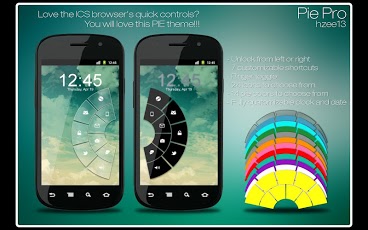
'Pie Pro - MagicLockerTheme' is a MagicLocker Theme App. To run this theme app, you must install MagicLocker App first.
********
Features:
- *NEW* Music controls
- *NEW* Font chooser for clock and date
- Lockscreen based on ICS browser's quick controls
- Unlocker appears on the left or right edge of the screen
- 7 customizable shortcuts
- Ringer toggle
- 24 icons to choose from
- 14 pie colors to choose from
- Fully customizable clock and date
- Missed calls and unread sms notifications
********
Design and icons copyright belongs to the author.
Q&A:
Q: How to find more MagicLocker Themes?
A: You can press 'More Themes' button in 'MagicLocker Setting -> Themes Tab'. Or search 'mobi.lockscreen.magiclocker.theme' in Google Market directly.
Q: How to install MagicLocker Themes?
A: After you install a MagicLocker theme app, you need to run the theme app and press 'Install this theme' button in the theme dialog.
Q: How to uninstall MagicLocker Themes?
A: You can long press a theme in 'MagicLocker Setting -> Themes Tab' then press 'Uninstall theme'. Or go to 'System Setting -> Applications -> Manage applications' then find the theme App to uninstall as general App.
Q: Why the 'Lost Robot' theme can't be uninstalled from MagicLocker?
A: 'Lost Robot' is the default theme in MagicLocker and MagicLocker must ensure there is at least one theme exist.
Q: Why a theme disappeared from 'MagicLocker Setting -> Themes Tab'?
A: First, please ensure your SD card is available, if yes, please try to reinstall the theme app.
About Pie Pro - MagicLockerTheme
The company that develops Pie Pro - MagicLockerTheme is h_zee13. The latest version released by its developer is 1.5.
To install Pie Pro - MagicLockerTheme on your Android device, just click the green Continue To App button above to start the installation process. The app is listed on our website since 2013-07-17 and was downloaded 0 times. We have already checked if the download link is safe, however for your own protection we recommend that you scan the downloaded app with your antivirus. Your antivirus may detect the Pie Pro - MagicLockerTheme as malware as malware if the download link to mobi.lockscreen.magiclocker.theme.paid.haron.Pie_Pro is broken.
How to install Pie Pro - MagicLockerTheme on your Android device:
- Click on the Continue To App button on our website. This will redirect you to Google Play.
- Once the Pie Pro - MagicLockerTheme is shown in the Google Play listing of your Android device, you can start its download and installation. Tap on the Install button located below the search bar and to the right of the app icon.
- A pop-up window with the permissions required by Pie Pro - MagicLockerTheme will be shown. Click on Accept to continue the process.
- Pie Pro - MagicLockerTheme will be downloaded onto your device, displaying a progress. Once the download completes, the installation will start and you'll get a notification after the installation is finished.
Program Details
System requirements
Download information
Pricing
Version History
version 1.5
posted on 2013-07-17
***Please set application for the last 3 shortcuts before using***,v1.5:,- Added Personal Message option,v1.4:,- Added ability to change the charging notification text (as per user request),v1.3:,- Added ability to have PIE always show,v1.2:,- Added music controls. Double tap the clock area to show music controls,- Added ability to change font for clock and date,v1.1:,- Removed duplicate G+ icon,- Added alarm and video icons,- Fixed some minor bugs
version 1.4
posted on 2013-02-17
Several fixes and updates
Disclaimer
Official Google Play Link
We do not host Pie Pro - MagicLockerTheme on our servers. We did not scan it for viruses, adware, spyware or other type of malware. This app is hosted by Google and passed their terms and conditions to be listed there. We recommend caution when installing it.
The Google Play link for Pie Pro - MagicLockerTheme is provided to you by apps112.com without any warranties, representations or guarantees of any kind, so access it at your own risk.
If you have questions regarding this particular app contact the publisher directly. For questions about the functionalities of apps112.com contact us.
